

Blogs
Dynamic Frequency Selection (DFS) in Wi-Fi: Radar Detection and 5 GHz Channel Behavior
April 30, 2026
Dynamic Frequency Selection (DFS) has been part of Wi-Fi for years, yet it still causes confusion for many network teams.
Some organizations avoid DFS channels entirely. Others use them but are unsure how radar detection works or what actually happens when an access point must change channels. In many cases, DFS concerns only become visible when something unexpected happens in production.
In a recent technical webinar, we walked through DFS behavior step by step. The goal was not just to explain the standards, but to look at how DFS behaves in real networks and what that means for wireless design and troubleshooting.
The takeaway is simple: DFS is not just a regulatory requirement. It directly affects channel planning, client behavior, and the amount of usable spectrum available in the 5 GHz band.
Before looking at design implications, it helps to understand how DFS works.
What Is DFS in Wi-Fi?
DFS stands for Dynamic Frequency Selection. It allows Wi-Fi devices to operate in parts of the 5 GHz spectrum that are shared with other incumbent systems as defined in the FCC’s DFS compliance procedures.
These incumbent systems include:
- Weather radar
- Military radar
- Aviation radar
- Maritime radar
Because these systems have priority over Wi-Fi, access points must continuously monitor the channel for radar signals.
If radar is detected, the access point must:
- Stop transmitting on that channel
- Notify connected clients(or should)
- Move off the channel
This process protects critical radar infrastructure while allowing Wi-Fi networks to use additional spectrum when radar is not present.
DFS Channels in the 5 GHz Band
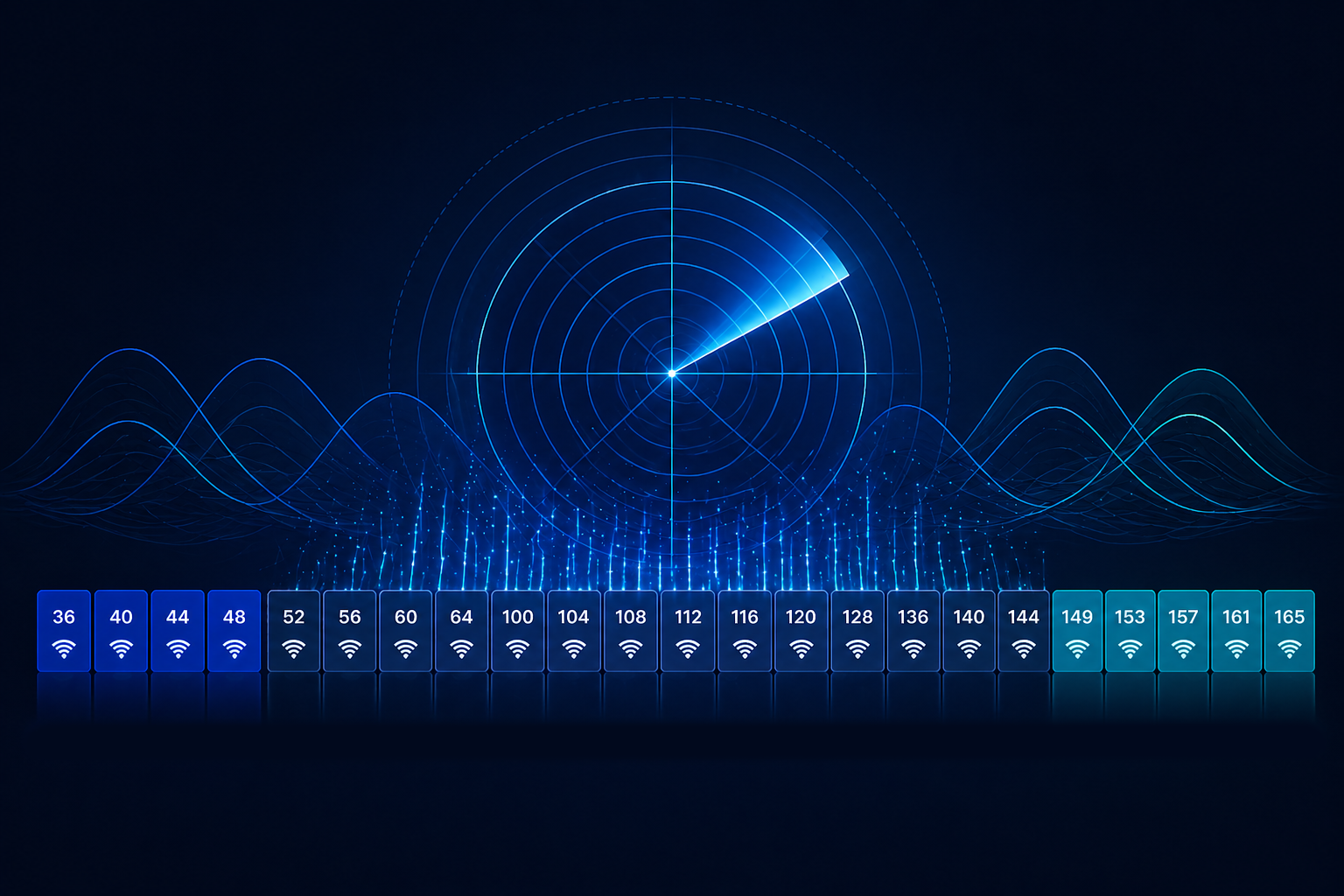
The 5 GHz band is divided into multiple channel groups called UNII bands.
Some of these require DFS detection, while others do not.
|
Band |
Channel Range |
DFS Required |
|
UNII-1 |
36–48 | No |
|
UNII-2A |
52–64 |
Yes |
|
UNII-2C |
100–144 |
Yes |
| UNII-3 | 149–165 |
No |
This distinction matters because a large portion of the 5 GHz spectrum requires DFS.
In fact, roughly 60% of available 5 GHz channels fall into DFS ranges. Because of this, understanding client support for DFS channels is critical when planning enterprise Wi-Fi deployments.
If a network avoids DFS entirely, it loses access to a substantial portion of the available channel space.
That can result in an increase of:
- Co-channel interference
- Airtime contention
- Channel reuse conflicts
In dense environments, these limitations can significantly reduce Wi-Fi performance.
What Happens When Radar Is Detected
Before an access point can transmit on a DFS channel, it must perform a Channel Availability Check (CAC).
In the United States, this listening period typically lasts 60 seconds.
If no radar is detected during that time, the AP may begin transmitting.
If radar appears during operation, the following sequence occurs:
- The AP detects the radar signal
- The AP stops transmitting on the channel
- A channel switch announcement should be sent to clients
- The AP moves to a new channel
- The original channel becomes unavailable for 30 minutes
This final step is called the non-occupancy period, which prevents the AP from returning to the channel immediately.
Channel Switch Announcements and Client Behavior
When DFS radar detection occurs, the access point does not simply drop connections.
Instead, it sends a Channel Switch Announcement (CSA) to connected clients.
The CSA informs clients:
- which channel the AP will move to
- when the move will occur
- whether transmissions should stop immediately
Clients that support CSA can follow the AP to the new channel quickly.
In many environments, the transition occurs in less than a second with minimal packet loss.
Older clients that do not support CSA may temporarily disconnect and reconnect through normal scanning.
Why Many Networks Avoid DFS Channels
Some organizations avoid DFS channels due to concerns about radar events or client compatibility.
Historically, this was sometimes justified. Early consumer devices and streaming products often lacked DFS support.
However, most modern enterprise and consumer devices now support DFS.
False Radar Detection
Not every DFS event is caused by real radar.
Some access points might occasionally trigger false radar detections due to aggressive detection algorithms.
When this happens, the AP may change channels even though radar is not present.
False detections can lead to unnecessary channel changes and user disruption.
Troubleshooting these events typically requires reviewing controller logs, spectrum data, or packet captures to identify the trigger.
DFS and 6 GHz Wi-Fi
DFS is often discussed alongside newer Wi-Fi technologies like 6 GHz.
While 6 GHz also protects incumbent spectrum users, it uses a different mechanism.
Most 6 GHz deployments use Low Power Indoor(LPI) mode for which there is not a need for incumbent detection mechanisms at all.
In the case of Standard Power, Automated Frequency Coordination (AFC) is used instead of radar detection to determine allowed channels and transmit power before occupancy.
This means spectrum protection in 6 GHz is coordinated differently than DFS in 5 GHz. Understanding these differences is important when designing networks that operate across multiple bands.
Practical DFS Design Considerations
For most enterprise networks, DFS should be treated as a normal part of channel planning.
A few practical guidelines help reduce potential issues:
Use DFS channels unless radar activity proves problematic
Avoiding them unnecessarily reduces available spectrum.
Start with smaller channel widths
20/40MHz channels provide more flexibility for reuse and interference management.
Distribute channels carefully across the spectrum
Avoid placing adjacent APs on adjacent channels.
Monitor radar events over time
If certain DFS channels trigger repeated events, they may be worth excluding.
Validate client support
Most modern clients support DFS and channel switch announcements, but specialized devices may require testing.
Visibility Matters When DFS Events Occur
Understanding what happened during a DFS event requires visibility into:
- channel changes
- radar detection events
- client roaming behavior
- packet-level traffic during transitions
Wyebot’s Wireless Intelligence Platform analyzes wireless environments from the client perspective, capturing channel changes, RF conditions, and network performance across 2.4 GHz, 5 GHz, and 6 GHz.
This helps teams understand exactly how DFS behavior affects real users and network performance.
DFS Wi-Fi Q&A
What is DFS in Wi-Fi?
DFS (Dynamic Frequency Selection) is a mechanism that allows Wi-Fi devices to operate on certain 5 GHz channels that are also used by radar systems. Wi-Fi access points must detect radar signals and vacate the channel if radar is present.
What are DFS channels?
DFS channels are portions of the 5 GHz Wi-Fi spectrum that require radar detection. In the United States, these include channels in the UNII-2A and UNII-2C ranges.
Why do Wi-Fi networks use DFS channels?
DFS channels provide additional spectrum for Wi-Fi networks. Using DFS increases the number of available channels, which reduces interference and improves network capacity.
Does DFS cause Wi-Fi interruptions?
When radar is detected, access points must move to a new channel. Modern Wi-Fi networks use channel switch announcements to notify clients, allowing many devices to transition with minimal disruption.
Should I disable DFS channels?
In most enterprise networks, disabling DFS channels is not recommended. Avoiding DFS reduces available spectrum and can increase congestion and interference.
How can I monitor DFS events in my network?
Monitoring DFS behavior requires tools capable of observing channel changes, client performance, and RF conditions. Client-side visibility platforms like Wyebot can help teams understand how DFS events affect real users and network performance.
If you want to go deeper into the technical details behind DFS, radar detection, channel switching, and 6 GHz incumbent protection, you may also want to review:
- The DFS Difference: What Every Network Engineer Needs to Know [Video]
- FCC DFS Compliance Procedures
- Running Event Wi-Fi at Cisco Partner Summit With Client-Side Insight From Wyebot – Cisco’s Blog
- Client Support for DFS Channels
- Wi-Fi Alliance AFC Information
- Exploring Automated Frequency Coordination in the Wi-Fi 6 GHz Realm