



Blogs
What Network Teams Should Actually Monitor: The Metrics That Matter Most
August 5, 2026
Network teams already collect extensive operational data. Controllers report access point status. Switches expose interface statistics. Firewalls generate session logs. Management platforms track utilization, CPU, memory, and device availability.
Users still report slow applications, frozen video calls, delayed authentication, and intermittent disconnects while infrastructure dashboards remain green. The gap is usually not a lack of monitoring. It is a mismatch between what the monitoring system measures and what users experience.
A client opening Microsoft Teams, Microsoft 365, Salesforce, or another cloud application depends on more than a healthy access point. The workflow may include Wi-Fi association, authentication, DHCP, DNS, switching, routing, security inspection, WAN connectivity, and the application itself. A delay at any point can affect the user even when every managed device remains operational.
Every metric should help answer four operational questions: Where is the problem? When did it begin? Who or what is affected? Why did it happen?
Modern Networks Require End-to-End Visibility
Enterprise application access now depends on a chain of services that extends beyond the campus LAN. A wireless client may associate successfully, complete 802.1X authentication, receive an IP address, resolve DNS, traverse security controls, cross the WAN, and finally connect to a cloud service.
The exact path varies by application and architecture, but the operational point is consistent. Users experience the workflow as a single service. They do not distinguish between a slow RADIUS exchange, a delayed DNS lookup, firewall inspection latency, WAN packet loss, or an application-side response problem.
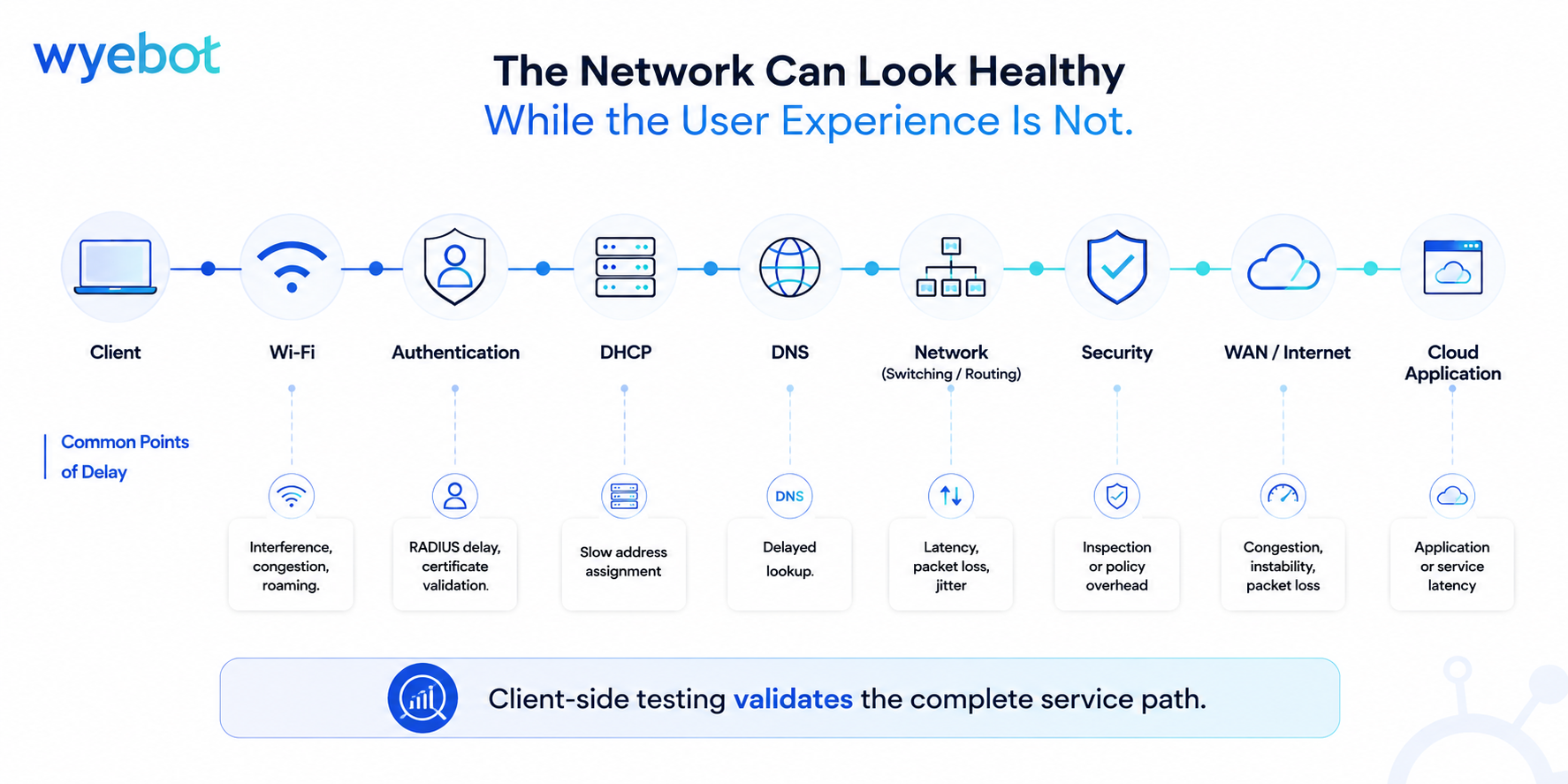
Every service in the client workflow can introduce delay while continuing to operate normally. Troubleshooting should validate the complete workflow before focusing on a single infrastructure component.
The Four Questions Every Monitoring Strategy Should Answer
1. Where is the problem?
The first task is to isolate the failure domain. Compare wired and wireless clients, buildings, floors, SSIDs, VLANs, authentication methods, and application paths.
If wired clients perform normally while wireless clients do not, investigate RF conditions, WLAN configuration, roaming behavior, and authentication. If wired and wireless users show the same symptoms, move upstream toward shared services such as DNS, WAN connectivity, security inspection, or the application.
Scope comparisons reduce the number of possible causes before packet captures, controller logs, or configuration reviews begin.
2. When did the problem begin?
Many network problems are intermittent and disappear before an engineer starts troubleshooting. Historical testing preserves the evidence.
A timestamped increase in packet loss, authentication delay, or DNS response time can be correlated with configuration changes, maintenance windows, ISP events, software updates, or recurring congestion. Without that timeline, teams often spend more time reproducing the symptom than investigating the event that introduced it.
3. Who or what is affected?
Not every issue affects the entire environment. The impact may be limited to one office, one SSID, one client type, one authentication method, or one application.
If voice and video degrade while web browsing remains normal, focus on latency, jitter, packet loss, QoS, and WAN conditions rather than general bandwidth. If failures occur only on one SSID or identity path, infrastructure outside that path can usually be deprioritized.
4. Why did it happen?
Root cause analysis requires correlation. Packet loss alone does not identify whether the source is RF interference, congestion, an overloaded device, or an unstable WAN circuit. Authentication delay can originate in RADIUS, Active Directory, certificate validation, or a cloud identity provider.
Viewed over time and alongside infrastructure events, client-side measurements provide the evidence needed to explain the failure rather than simply confirm that users experienced one.
See the Network from the Client’s Perspective
Learn how Wyebot provides the client-side visibility and testing network teams need to identify issues, isolate root causes, and optimize Wi-Fi performance.
The Metrics That Matter Most
Latency
Latency measures how long each packet takes to travel between two points on the network. Modern applications depend on repeated request-and-response exchanges, so additional delay accumulates across DNS lookups, authentication steps, API calls, and content requests.
High latency may be introduced by WAN distance, routing changes, overloaded devices, firewall inspection, retransmissions, or upstream service delays. It should be one of the first measurements reviewed when users report slow or unresponsive applications.
Packet Loss
Packet loss measures how often traffic fails to reach its destination. Common causes include RF interference, wireless congestion, overloaded hardware, damaged links, unstable WAN circuits, and software defects.
TCP recovers through retransmission, which increases response time and reduces efficiency. Real-time voice and video traffic has less recovery time, so lost or late packets appear as clipped audio, frozen video, or brief call interruptions. Persistent packet loss should be investigated even when utilization remains low.
Jitter
Jitter measures variation in packet latency. Voice and video applications depend on predictable delivery intervals. Playback buffers can absorb limited variation, but sustained jitter produces robotic audio, clipped speech, and unstable video.
Jitter commonly appears with congestion, packet loss, or WAN instability. It is most useful when interpreted with latency and loss rather than as an isolated value.
DNS Response Time
DNS response time measures how quickly a client can locate the services an application needs. Slow DNS usually does not make an application run slowly after the connection is established. It delays the initial lookup, making the application appear unresponsive or slow to start.
A DNS server may remain available and answer every request while response time degrades. Measuring lookup performance helps distinguish delayed name resolution from poor Wi-Fi, Internet congestion, or application-side latency.
Authentication Performance
Enterprise wireless access commonly depends on RADIUS, directory services, certificates, and identity providers. Delays in any part of that exchange increase connection time even when RF conditions and network capacity are acceptable.
Authentication performance can also affect roaming. Depending on the security design and fast-transition configuration, a client may need to interact with the authentication infrastructure again during a roam. Measuring authentication time helps distinguish RF or roaming problems from delays in the identity path.
DHCP Performance
DHCP determines how quickly a client receives the addressing information required to communicate. A successful Wi-Fi association followed by a slow DHCP exchange often appears to the user as a wireless connection that is present but unusable.
Monitor address assignment time, failure rates, scope utilization, relay behavior, and server response. DHCP should be measured separately from association and authentication so the delay is attributed to the correct stage of the connection process.
Throughput
Throughput measures how much data can be transferred during a given period. It is useful for validating ISP circuits, WAN capacity, wireless performance under load, large file transfers, and post-change baselines.
Throughput does not represent overall application responsiveness. A connection can deliver high bandwidth while latency, packet loss, DNS, or authentication delays still create a poor user experience.
Why Speed Tests Can Be Misleading
A speed test measures sustained upload and download capacity between two endpoints. It is useful for validating available bandwidth, ISP performance, and expected throughput after an infrastructure change.
Enterprise applications depend on many small exchanges including DNS lookups, TLS negotiation, authentication, and API requests. Their responsiveness depends on latency, packet loss, jitter, and service response time, not bandwidth alone.
Speed tests remain valuable, but they should be interpreted alongside latency, packet loss, jitter, DNS response time, authentication performance, and application testing.
Building a Monitoring Strategy That Reflects User Experience
A monitoring server in a data center can confirm that an application is reachable, but it cannot represent a branch user connected over Wi-Fi. A wired endpoint cannot validate association, roaming, RF interference, or wireless authentication. Place tests at representative wired and wireless locations, including headquarters, branch offices, corporate SSIDs, guest networks, and other environments with distinct service paths.
Continuous testing is necessary because many failures are brief. Packet loss may last only a few minutes. Authentication may slow during a login surge. RF interference may appear only when client density is high. Historical results preserve those events for later correlation.
A balanced monitoring strategy typically includes:
- Client-side testing from representative wired and wireless locations
- Continuous latency, packet loss, and jitter measurements
- DNS, DHCP, and authentication performance testing
- Periodic throughput testing for capacity validation
- Application and Internet reachability testing
- Historical reporting for trend and event correlation
- Infrastructure telemetry from controllers, switches, routers, firewalls, and supporting services
No single test identifies every problem. The objective is to collect enough evidence to isolate the affected service path, correlate the event with infrastructure behavior, and verify the root cause.
Conclusion
Infrastructure monitoring explains the health of the network. Client-side testing validates the services users rely on to connect and reach applications. Together, they provide the context needed to isolate problems faster, identify root causes with greater confidence, and reduce troubleshooting time.
Go Beyond Infrastructure Health
Wyebot continuously tests the services users depend on, from Wi-Fi association and authentication to DNS, DHCP, applications, and the Internet. Give your network team the evidence it needs to identify issues faster and troubleshoot with greater confidence.
Frequently Asked Questions
What network metrics are most important for troubleshooting user experience?
Latency, packet loss, jitter, DNS response time, DHCP performance, authentication time, and throughput provide the most useful client-side context. Infrastructure metrics such as CPU, memory, utilization, interface errors, and device status remain necessary for identifying the component responsible for the problem.
Why isn’t a speed test enough to measure network performance?
A speed test measures sustained upload and download capacity. It does not measure DNS lookup time, authentication delay, DHCP assignment, packet loss, jitter, or application response. A connection can deliver high throughput while users still experience slow application startup, poor voice quality, or delayed access.
What is the difference between infrastructure monitoring and client-side testing?
Infrastructure monitoring measures the health and behavior of managed devices and services. Client-side testing validates the workflow a user follows to join the network and reach an application. Combining both provides the context needed to connect a user symptom to the responsible infrastructure or service.
Why can users report slow Wi-Fi when the WLAN appears healthy?
The client may associate successfully while another stage of the workflow is delayed. Common causes include RADIUS response time, certificate validation, DHCP assignment, DNS lookup time, roaming behavior, WAN latency, packet loss, or application-side performance.
How does DNS affect application performance?
DNS determines how quickly a client can locate the services an application needs. Slow DNS commonly delays application startup or makes the application appear initially unresponsive. Once the lookup completes and the connection is established, DNS usually does not control the ongoing performance of that session.
How can authentication affect Wi-Fi roaming?
Enterprise WLANs may need to exchange information with RADIUS or other identity services during a roam, depending on the security design and fast-transition configuration. Slow authentication can increase roam time and may be perceived as a coverage or roaming problem even when RF conditions are acceptable.
Why is historical network data important?
Many network issues are intermittent and disappear before troubleshooting begins. Historical data allows engineers to correlate packet loss, latency, DNS, DHCP, or authentication changes with configuration updates, maintenance windows, ISP events, and recurring periods of congestion.
What should an enterprise network monitoring strategy include?
Use representative wired and wireless test locations, continuous latency and loss measurements, DNS, DHCP and authentication tests, periodic throughput validation, application reachability checks, historical reporting, and infrastructure telemetry from the devices and services supporting the client path.