Wi-Fi roaming occurs when a client moves its association from one BSSID to another within the same extended service set, or ESS. The radios share an SSID, but each radio has a unique BSSID. During a roam, the client disconnects from its current radio and reassociates with another. The interruption must be short enough to preserve voice, video, and other latency-sensitive sessions.
The client controls this process. Access points can provide information, recommend transitions, and accelerate authentication, but the client decides when to scan, which access point to select, and whether the available improvement justifies roaming.
Effective roaming depends on RF design, consistent WLAN configuration, client behavior, and support for 802.11k, 802.11v, and 802.11r.
The Wi-Fi Roaming Process
Most clients follow the same general sequence. The implementation and thresholds vary by chipset, driver, operating system, and device type.
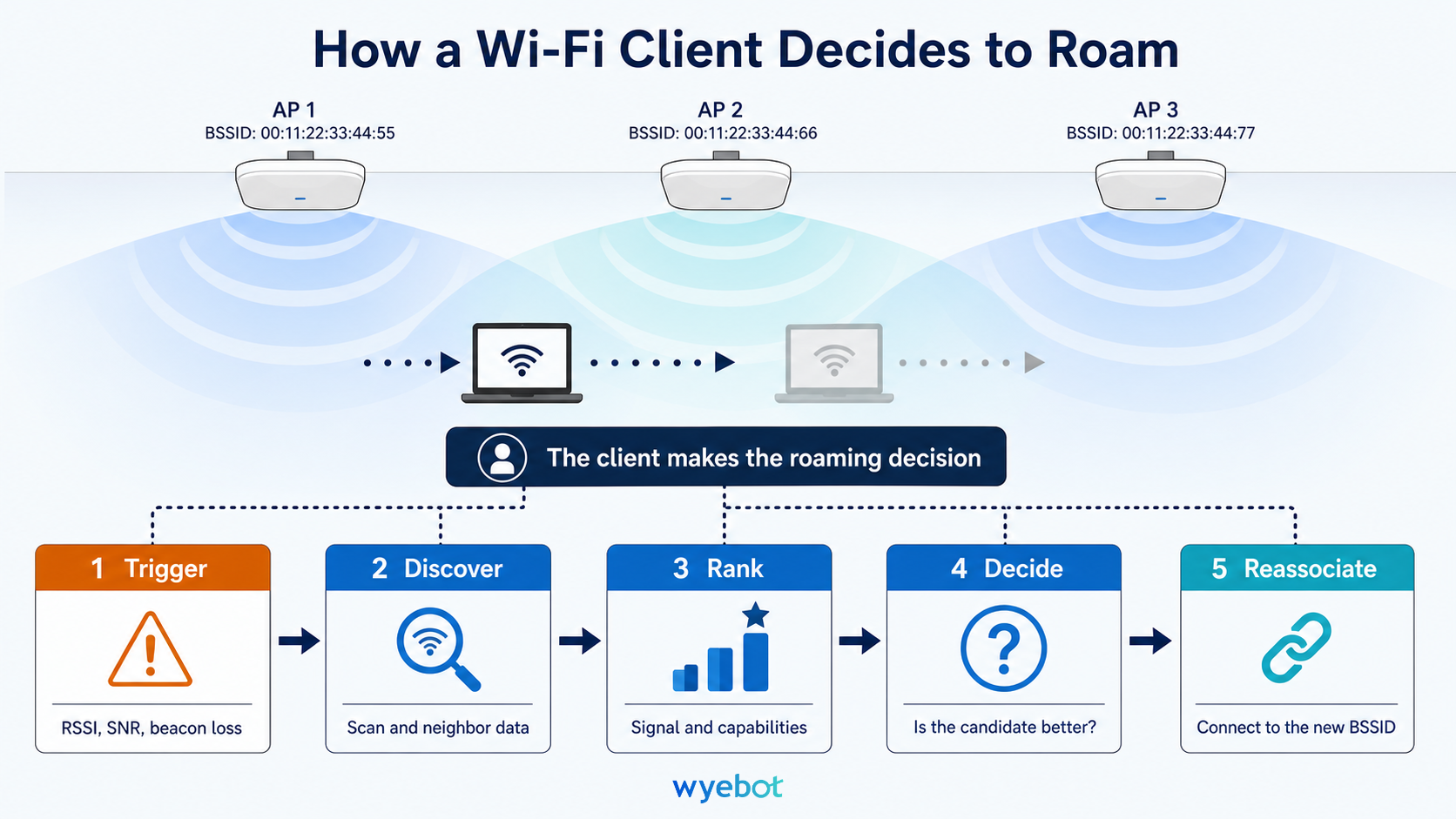
First, the client reaches a roaming trigger. It then discovers nearby access points, ranks the available BSSIDs, and determines whether a candidate is sufficiently better than its current connection. If the client approves the transition, it reassociates and completes any required security exchanges.
A client may decide to remain associated with its current access point after scanning. This happens when no candidate is available or when the best candidate provides only a small improvement. Drivers commonly enforce a delay before scanning again to prevent continuous scanning and repeated transitions.
Wi-Fi roaming follows a client-controlled process that begins with a trigger and ends with reassociation to a new BSSID.
What Triggers a Wi-Fi Client to Roam
Received signal strength indicator, or RSSI, is the most common roaming trigger. A driver may begin looking for another access point when the current connection falls below a threshold such as -70 or -75 dBm.
Depending on the implementation, a client may also consider the following conditions.
Signal-to-noise ratio
Beacon loss
Current data rate or MCS
Channel utilization
Device power state
Roaming thresholds are client-specific and often undocumented. Published examples demonstrate how much behavior can vary within one device ecosystem. Some mobile devices begin scanning at a higher RSSI than laptops, causing them to roam sooner. Other devices use different beacon-loss timers depending on whether the display is active.
A client that remains connected to a distant access point may be operating as designed. If its RSSI has not crossed the roaming trigger, it has no reason to begin evaluating alternatives.
How Scanning Affects Active Traffic
After reaching its roaming threshold, the client must discover other BSSIDs advertising the same SSID. It does this through passive or active scanning.
During passive scanning, the client tunes to a channel and waits for beacon frames. A typical beacon interval is approximately 102.4 milliseconds, so scanning many channels can take significant time.
During active scanning, the client transmits a probe request and waits for probe responses. Responses usually arrive faster than the next scheduled beacon, reducing channel dwell time. Regulatory constraints and network configuration can restrict active scanning on some channels.
Scanning is disruptive because the client radio leaves its serving channel. While it is tuned elsewhere, it cannot exchange data with the current access point. A full scan may increase latency, cause packet loss, and affect real-time applications. The impact becomes more significant as the number of supported bands and channels grows.
The 6 GHz band presents a larger discovery problem because it contains many possible channels. Clients can use a Reduced Neighbor Report carried in 2.4 or 5 GHz beacon and probe-response frames to identify 6 GHz BSSIDs and their channels. This reduces the need to search the full 6 GHz band. This is an important consideration when evaluating 5 GHz vs 6 GHz Wi-Fi roaming behavior.
How Clients Select an Access Point
After scanning, the client ranks candidate BSSIDs. RSSI is usually a major input, but many drivers also evaluate capabilities advertised in beacon or probe-response frames.
Depending on the client implementation, candidate selection may consider band, channel width, supported Wi-Fi generation, expected data rate, security configuration, and channel utilization. Some clients favor newer PHY capabilities or wider channels after applying minimum RSSI requirements.
This can complicate 6 GHz vs 5 GHz performance decisions. In the United States, a 6 GHz access point may have access to more spectrum and wider channels than 5 GHz. Its RSSI may be lower because of transmit-power limits, antenna characteristics, obstructions, and propagation conditions. A client may select 5 GHz when the 6 GHz signal is below its usable threshold. Another client may prefer 6 GHz because it predicts a higher data rate.
The differences between 6 GHz coverage vs 5 GHz coverage become more apparent near cell edges and through walls. At equal transmit power, 6 GHz has approximately 1 to 2 dB more free-space path loss than 5 GHz. Transmit-power limits, antenna characteristics, channel width, and building materials can create a larger difference in usable coverage. WLAN designs should provide enough overlap for clients to discover a clearly better candidate without creating excessive co-channel contention.
Why the Strongest Candidate May Not Win
Finding a stronger BSSID does not guarantee a roam. Most drivers require a meaningful improvement over the current access point. This hysteresis prevents ping-pong roaming caused by normal RSSI fluctuations.
For example, a client that begins scanning at -75 dBm may require a candidate to be 8 or 12 dB stronger. Under those conditions, the target access point may need to be received at -67 or -63 dBm before the client moves.
This behavior has direct design implications. Primary work areas and mobility paths need sufficient secondary coverage. Large areas near a client’s roaming threshold can cause frequent background scanning. Excessive transmit power can create the opposite problem by allowing clients to retain an association for too long.
AP transmit power should also account for the client uplink. An access point transmitting at maximum power may be audible at a distance where the client cannot return frames reliably.
What 802.11k, 802.11v, and 802.11r Do
802.11k provides neighbor reports. A client can request a list of nearby BSSIDs and their channels from the access point. The client can then scan a targeted set of channels instead of the full regulatory channel list. This reduces scan time and the resulting interruption.
802.11v provides BSS transition management. An access point can recommend that a client move and may include a preferred BSSID. The client still decides whether to accept the recommendation. Aggressive configurations can deauthenticate clients that reject the request, so forced transition behavior requires testing against the deployed client population.
802.11r provides fast BSS transition. It allows compatible clients to derive or reuse keying material during reassociation, reducing the authentication work required during a roam. The benefit is especially important on WPA2-Enterprise and WPA3-Enterprise networks, where a full 802.1X and RADIUS exchange may otherwise occur after each transition.
PMK caching can also reduce authentication time when a client returns to an access point it has previously used. Its scope is narrower than 802.11r because cached keys may apply only to previously visited authenticators.
Common Causes of Wi-Fi Roaming Failures
A successful roam normally includes a reassociation exchange. Packet captures that show repeated new associations instead of reassociations may indicate a compatibility or configuration problem.
Common failure causes include inconsistent security settings, failed 802.1X authentication, incorrect 802.11r configuration, AP admission controls, and aggressive load balancing. After a failed reassociation, many clients attempt a normal association. This recovery can take several seconds and disrupt active sessions.
Repeated failures may cause a client to place the target BSSID on an internal blocklist. Some devices eventually disable the network and require the user to reconnect manually.
Layer 3 boundaries add another requirement. If roaming places the client on a different subnet, its existing IP address may no longer be valid. Enterprise WLAN platforms can use Layer 3 roaming or anchoring to preserve the client session across routed boundaries.
Wi-Fi Roaming Design Practices
Design the WLAN around the devices and applications that will use it. Validate actual roaming thresholds instead of relying only on a generic minimum RSSI target.
Maintain consistent settings across each mobility area. Channel width, security mode, authentication method, fast-transition configuration, and supported WLAN capabilities should remain predictable from one access point to the next. Mixed configurations can attract clients to a distant radio or cause reassociation failures.
Use consistent channel widths within each band. A design can use 40 MHz channels in 5 GHz and 80 MHz channels in 6 GHz, but nearby radios within the same band should avoid arbitrary width differences.
Plan 5 GHz and 6 GHz coverage separately. Under U.S. FCC rules, Low Power Indoor access points are restricted to indoor operation and do not require Automated Frequency Coordination. Standard Power access points may operate indoors or outdoors but must obtain channel and power authorization from an Automated Frequency Coordination system.
The comparison between 6 GHz Standard Power vs Low Power Indoor affects cell size, allowed locations, and frequency coordination requirements. Neither configuration removes the need to validate client uplink performance and roaming overlap.
Enable 802.11k where client and infrastructure support are reliable. Use 802.11v when there is a defined need for band steering, congestion management, or transition recommendations. Enable and test 802.11r on enterprise-authenticated WLANs where authentication delay affects mobility.
Finally, collect data from the client perspective. Useful evidence includes RSSI before and after each roam, scan results, target BSSID, roaming reason, reassociation duration, authentication time, packet loss, and failure status. Controller logs alone may not explain why the client rejected a candidate.
See how the Wyebot DEX Agent captures roaming events, connection triggers, signal strength, and client experience.
Frequently Asked Questions About Wi-Fi Roaming
Who decides when a Wi-Fi client roams?
The Wi-Fi client decides when to roam and which access point to select. Access points can provide neighbor information through 802.11k, recommend transitions through 802.11v, and accelerate authentication through 802.11r. The client’s driver still applies its own roaming trigger, candidate ranking, and minimum-improvement requirements.
What RSSI should trigger Wi-Fi roaming?
There is no universal roaming RSSI. Many clients begin scanning between approximately -70 and -75 dBm, but thresholds vary by chipset, operating system, device type, traffic state, and driver configuration. Engineers should test representative production clients and verify that a sufficiently stronger candidate is available when each device reaches its trigger.
Does 802.11k make roaming faster?
802.11k can reduce roaming scan time by providing the client with a list of nearby BSSIDs and their channels. The client can scan those channels instead of searching the full channel set. Client support and behavior vary, and a client is not required to use the report.
What is the difference between 802.11v and 802.11r?
802.11v allows an access point to recommend a BSS transition. 802.11r reduces the security exchanges required when the client reassociates. The first helps guide access point selection. The second helps shorten the resulting transition, particularly on enterprise-authenticated WLANs.
Is 6 GHz better than 5 GHz for Wi-Fi roaming?
6 GHz can provide wider channels and less legacy contention, while 5 GHz often provides a larger usable coverage area under comparable conditions. Actual 6 GHz vs 5 GHz performance depends on power limits, channel width, client capability, building materials, and cell design. Reliable roaming requires adequate overlap in both bands.
Why does a Wi-Fi client stay connected to a distant access point?
The client may not have crossed its roaming trigger, or a nearby access point may not exceed the driver’s minimum improvement threshold. Inconsistent channel widths, security settings, or Wi-Fi capabilities can also influence candidate ranking. Client-side scan data is the most useful evidence for determining the cause.